Rick ASCII — Turning a Rickroll into Characters
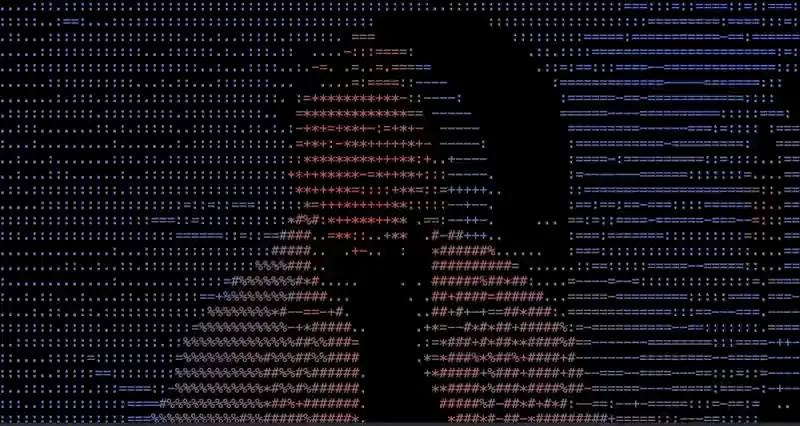
What would a video look like if every pixel became a character?
On this page
I just wanted to see if I could.
No deeper reason than that. I was messing around with the canvas API and wondered — what would it look like if every pixel in a video frame was replaced with a character? Could you still recognise what you were watching?
Turns out, yes. And it works better than it probably should.
Every frame of that video is being converted to text, roughly 30 times a second. The characters aren’t random — each one is chosen based on how bright or dark that part of the image is.
The Core Idea
The entire thing comes down to one insight:
Dark pixel → dense character. Bright pixel → light character.
Here’s the character set the converter uses:
const charSet = ' .:=-+*#%@';Read it left to right — @ is visually heavy, takes up a lot of space. A space character is essentially invisible. Everything in between is ordered by how much visual weight it carries.
So a very dark pixel maps to a space character. A very bright pixel maps to @. Everything else lands somewhere in the middle.
That’s it. That’s the whole trick. Everything else is just wiring.
The Pixel Loop
convertToPlainASCII(imageData) {
const pixels = imageData.data;
let asciiArt = '';
for (let y = 0; y < imageData.height; y += 2) {
let line = '';
for (let x = 0; x < imageData.width; x++) {
const i = (y * imageData.width + x) * 4;
const r = pixels[i];
const g = pixels[i + 1];
const b = pixels[i + 2];
const brightness = (r * 0.3 + g * 0.59 + b * 0.11) / 255;
const charIndex = Math.floor(brightness * (charSet.length - 1));
line += charSet[charIndex];
}
asciiArt += line + '\n';
}
return asciiArt;
}getImageData() returns the raw pixel data for the current frame — every pixel as four values: red, green, blue, and alpha. For each pixel, we calculate a single brightness value and use it to pick a character.
The brightness formula is worth pausing on:
const brightness = (r * 0.3 + g * 0.59 + b * 0.11) / 255;You might expect it to just average the three channels equally. But human eyes aren’t equally sensitive to red, green and blue — we’re most sensitive to green, less so to red, and least to blue. So each channel is weighted accordingly. This is the standard ITU-R BT.601 luminance formula, and it produces a brightness value that actually matches what we perceive rather than just what the numbers say.
Once we have brightness as a value between 0 and 1, we map it to a character index:
const charIndex = Math.floor(brightness * (charSet.length - 1));Dark pixel → low brightness → low index → a space character. Bright pixel → high brightness → high index → @. Build that up row by row and you get ASCII art.
The Aspect Ratio Fix
One thing that isn’t obvious: the loop steps y += 2, skipping every other row.
Monospace characters are roughly twice as tall as they are wide. If you processed every row, the output would look squashed vertically — twice as tall as it should be. Skipping every other row compensates for that, and the result looks proportional.
The Colour Mode
This is the part I found most interesting — and the reason I built it this way is probably worth explaining.
When you toggle colour mode, the characters don’t change — the colour isn’t applied to the text at all. Instead, a video element is overlaid directly on top of the ASCII output using CSS:
#colorOverlay {
position: absolute;
top: 0;
left: 0;
width: 100%;
height: 100%;
mix-blend-mode: color;
}mix-blend-mode: color is what makes it work. It takes the hue and saturation from the top layer — the video — and the luminance from whatever is underneath — the ASCII text. The characters provide the light and dark. The video provides the colour. Neither works alone.
The ASCII art is doing the heavy lifting. The video is just colouring it in.
That’s the bit that surprised me most. I expected to have to do something complicated — loop through every character and apply a colour based on the corresponding pixel. Instead, the browser handles the whole thing with one CSS property.
Why Overlay Instead of Colouring Each Character
The obvious approach would be to colour each character individually — sample the pixel colour at that position, wrap the character in a <span>, apply the colour as an inline style, repeat for every character in the frame.
That’s potentially thousands of DOM updates, 30 times a second. It would destroy the frame rate.
The reason I went with the overlay instead is that the video was already being decoded for the canvas sampling. It was just sitting there. So rather than doing expensive work in JavaScript to recreate the colour information that already existed, I just showed the video directly — on top of the ASCII output, blended with one CSS property.
mix-blend-mode is handled by the browser’s compositor, which runs on the GPU and never touches the JavaScript thread. It costs almost nothing compared to what the alternative would have been.
It’s a good example of a general principle: before you write code to do something, check if the browser already does it.
If You Want to Build Something Similar
Performance. Calling getImageData() every frame is expensive — it reads raw pixel data from the GPU back to the CPU. For a demo it’s fine. In a production context you’d want to throttle it or look at alternatives.
Resolution. Higher width means more characters, more detail, but also more work every frame. There’s a sweet spot around 100–150 characters wide where the output looks good without hammering the browser.
Font. This only works with a monospace font. The whole grid relies on every character taking up exactly the same amount of space. Proportional fonts break it immediately.
Final Takeaway
The gap between “this looks complex” and “this is actually simple” is usually just one concept.
Here it’s: brightness maps to density.
Once that clicks, the rest follows naturally. The pixel loop, the character set, the aspect ratio fix — they’re all just consequences of that one idea.
And the colour mode is a good reminder that sometimes the browser already has exactly the tool you need. You just have to know to look for it.
Originally published on Medium .