
Using My Own DSL Taught Me More Than Building It Did
Building a DSL is the tractable problem. Using one on something real — a calculator, five clicks, a failing test — showed me the part I'd missed.
On this page
This is a follow-up to I Just Wanted Course Authors to Write Tests. I Ended up Building a Language. — worth reading first if you haven’t.
I thought the hard part was building the language.
It wasn’t.
Last time, I built a DSL for my learning platform — a simple syntax that lets course authors write test logic without writing code. A compiler that translates it into structured actions. A runner that executes those actions against a real DOM.
It worked. At least, it worked in isolation.
Then I tried to use it on something real.
The Subject
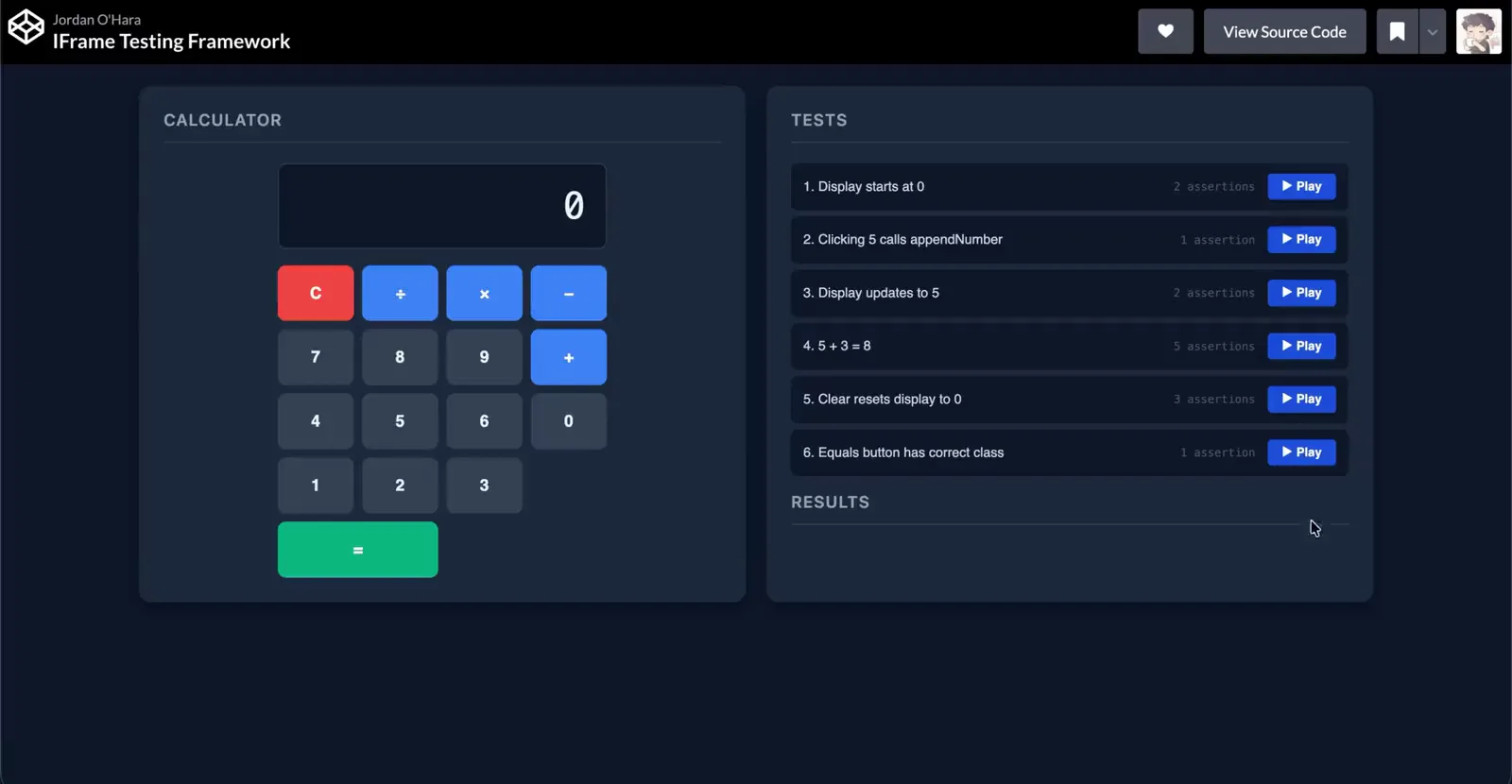
I needed something to test against. A calculator felt right — simple enough that the reader doesn’t get lost in the subject, complex enough to have real state, real interactions, and something actually worth asserting.
Click a number. Click an operator. Click another number. Click equals. Assert the result.
That’s a real user flow. And it turned out to be exactly the right thing to expose everything the DSL couldn’t do yet.
The First Problem — One Selector Per Test
The original DSLTest structure looked like this:
interface DSLTest {
name?: string;
selector: string;
assertions: Assertion[];
}One test, one selector, one set of assertions.
For a simple check — does the display start at 0, is this button visible — that’s fine. But the moment I tried to write a stateful test, I hit a wall.
To test that 5+3=8, I needed to:
- Click 5
- Click +
- Click 3
- Click equals
- Assert the display shows 8
Five different selectors. Five different actions. One logical test.
With the original structure, I had two bad options. Split it into five separate DSLTest objects — each one depending on the state left by the previous one, which breaks isolation entirely. Or cram everything into one selector and pretend the other steps don’t exist.
Neither worked. The structure was wrong for the problem.
The Fix — Multi-Step Tests
The issue was that DSLTest modelled a single element interaction, not a user flow. So I introduced DSLStep:
interface DSLStep {
selector: string;
assertions: Assertion[];
}and updated DSLTest to use it:
interface DSLTest {
name?: string;
steps: DSLStep[];
}Now a single test is a sequence of steps. Each step targets a selector and runs its assertions. The calculator test became:
{
name: "5 + 3 = 8",
steps: [
{ selector: '[data-number="5"]', assertions: [{ type: "click" }] },
{ selector: '[data-action="add"]', assertions: [{ type: "click" }] },
{ selector: '[data-number="3"]', assertions: [{ type: "click" }] },
{
selector: '[data-action="equals"]',
assertions: [{ type: "click.calls", fn: "calculate" }],
},
{ selector: "#display", assertions: [{ type: "contains.text", value: "8" }] },
],
}Each test now sets up its own state and asserts its own result. No dependencies between tests. No shared state. Reset the calculator before each run and you’re done.
The compiler change was minimal — instead of compiling one selector’s assertions, it loops through steps:
for (const step of test.steps) {
actions.push({ name: "get", args: [step.selector] });
step.assertions.flatMap(compileAssertion).forEach((a) => actions.push(a));
}One structural change. Everything else stayed the same.
That’s the thing about a well-separated architecture — when the types are wrong, fixing them doesn’t break everything else. The compiler, the runner, the assertion registry — none of them needed to change. Just the shape of the data flowing through them.
The Second Problem — Users Don’t Know Where the Test Is Looking
Once the tests were passing, I had a different problem.
Watching a list of green ticks appear is useful if you already understand what’s being tested. It’s useless if you don’t.
A new learner watching their test fail has no idea where to look. Is the selector wrong? Does the element not exist? Is the assertion checking the right thing?
The output tells them “what” failed. It tells them nothing about “where”.
I’d built a language for writing tests. I hadn’t built a way to understand them.
The Visual Debugger
The fix was a step-through visual debugger. When you play a test:
- A dark overlay covers the page
- The target element is highlighted — a blue border cuts through the overlay so the element glows through
- A tooltip appears near the element showing what’s being checked
- A bottom bar shows the current step and a Next button
- When you click Next, the assertion runs and the border flashes green or red before moving on
It sounds like a lot. In practice it takes about two seconds to understand what a test is doing — which is the whole point.
The highlight is just a fixed-position div positioned over the element’s bounding rect:
const rect = element.getBoundingClientRect();
this.highlight.style.top = `${rect.top - padding}px`;
this.highlight.style.left = `${rect.left - padding}px`;
this.highlight.style.width = `${rect.width + padding * 2}px`;
this.highlight.style.height = `${rect.height + padding * 2}px`;The overlay dims everything else. The highlight punches through it. The tooltip tells you what’s happening. The result flashes to tell you if it passed.
→ Try the Calculator DSL Tests on CodePen
Play any test and step through it. Watch where the highlight moves. That’s the runner, made visible.
The Questions I Couldn’t Dodge
I shared the build with a developer friend — and his first questions were about race conditions, performance, and React.
Good questions. Here’s the honest answers.
Performance: is fine for the current scope. The runner is a sequential for loop with await at each step. Nothing runs in parallel. postMessage is lightweight. querySelectorAll on simple exercises is negligible.
Race conditions: are handled in three places. The iframe doesn’t receive tests until it signals iframe-ready via postMessage — a handshake that ensures the DOM is loaded before anything runs. The wait assertion type handles async DOM updates the same way cy.wait() does in Cypress — a deliberate pause before asserting. And the run button is disabled while tests are in progress, preventing two runners executing simultaneously in the same iframe.
React: is a future problem. When I get there, the right approach is probably Sandpack — the open source library CodeSandbox built specifically for running user code safely in a browser context. It handles npm dependencies, JSX compilation, and module resolution without needing a server. For now, HTML, CSS and vanilla JS don’t need it.
My friend also pointed out that React timing specifically could go deep — concurrent mode, Suspense, batched updates. He’s right. Even Playwright has open issues around this. The answer for a learning platform isn’t to solve Playwright-level React testing. It’s to scope what exercises I support initially, and extend the runner when I need to.
Knowing where the boundaries are is part of building something real.
Final Takeaway
Building the DSL taught me how languages work — the separation between syntax, compilation, and execution, and why that separation matters.
Using it taught me something different.
A language is only as good as the experience around it. The syntax I designed, the compiler I wrote, the runner I built — those were the tractable problems. Once they worked, I thought I was done.
I wasn’t. The harder problem was making the whole thing understandable to someone encountering it for the first time. Someone who doesn’t know what a selector is, or why a test might fail, or where the runner is even looking.
The visual debugger isn’t a feature bolted onto the DSL. It’s part of what the DSL is. Without it, the language works but doesn’t teach. With it, every test becomes something you can follow — step by step, element by element, result by result.
That’s what I didn’t know I was building until I tried to use what I’d already built.
Originally published on Medium .